|
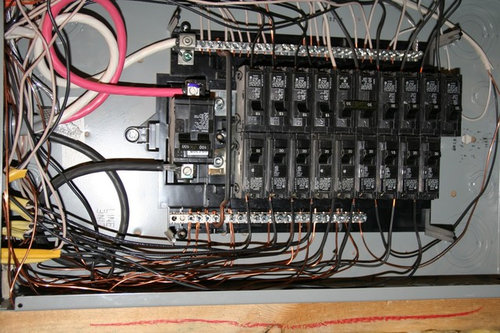
| Our inspector dinged the subpanel for not separating grounds and neutrals. When I look, there's one ground that is attached next to the neutrals on the right. If I move that over, is that the only defect you see?
The inspector also said the copper crossbar should be removed that connects the ground and neutral bus because it's a subpanel. I assume that's the bar near the top with curved ends that is bridging it? Also, we didn't have the bushings at the top of the panel as it enters through the top. I bought some metal ones at Lowe's that we'll pass the wires through. |
Here is a link that might be useful: Pic of subpanel
Follow-Up Postings:
|
- Posted by weedmeister (My Page) on Tue, Jul 12, 11 at 16:59
| If I'm seeing this correctly, that bare aluminum line attached to the neutral bar at the bottom right needs to be moved over to the ground bar on the left. The copper bar at the top that bridges from the left to the right needs to come out. I think I see an additional ground on the right bar? that needs to be moved to the left. |
|
- Posted by ronnatalie (My Page) on Tue, Jul 12, 11 at 17:03
| I'm seeing several problems. First off you need to separate the bars with that big interconnecting copper wrire with teh U-shaped ends. You've got the grounds and neutrals 100% on the wrong bar. The bar on the left is electrically isolated from the case (if you remove that joining bar). You need to move all the white wires over there including finding some terminal big enough to get the neutral from the feeder over there. All the grounds need to go to the right side bar including the one that came in with the feeder. This is because that GREEN SCREW there I believe is joining that bar to the case (as it should). |
|
- Posted by bus_driver (My Page) on Tue, Jul 12, 11 at 18:16
| Ron, why not remove the jumper bar connecting the two and move the green screw to the left to bond the left bar to the cabinet. The bare at the bottom right would also be moved to the left to ground the bar to the service. The green screw as pictured is bonding the neutral to the cabinet. |
|
- Posted by ronnatalie (My Page) on Tue, Jul 12, 11 at 19:16
| IF the green screw will go into the right bar and bond the case that will work. |
|
- Posted by bus_driver (My Page) on Tue, Jul 12, 11 at 20:54
| The is a hole at the top of the LEFT bar that appears to be intended for the bonding screw. |
|
| It looks like there is a white wire going to a breaker? On the right. I'm reading this on a little iPhone screen so I may not be seeing it right. |
|
| Never mind, I looked on a larger screen and see it's a 240 |
|
| The green bonding screw will only fit in the hole it's in on the right side. You either need to reverse the grounds and neutral wires as explained above or remove the screw and bond the left bus bar to the panel. Bare Al wire and all bare or green wires to the ground (bonded) bar, all whites to the isolated bar. |
|
| "bond the left bus bar to the panel" And remember that you must use a machine threaded hole and screw. If you can isolate all the present bars form the case you can remove the bonding screw from the bar to the case and then add a grounding bar. It appears that the only bond to the case from both bars is the single screw. You can probably remove the screw, use both bars for neutrals (since they are now isolated but bonded to each other) and install a separate grounding bar. There should be tapped holes at the correct spacing to mount the separate ground bar.
|
|
| The bar on the right is clearly intended to be the neutral bar, since it has the connection for the feed. You remove the green screw to de-bond it from the case in a subpanel installation. I'm not sure what's going on with that bar on the left. In the panels I've worked with, the bar that's intended to be the ground bar is permanently bonded to the box. Is that the case here? If not, there doesn't appear to be a way to do it -- you'll have to install a separate ground bar. |
Please Note: Only registered members are able to post messages to this forum. If you are a member, please log in. If you aren't yet a member, join now!
Return to the Electrical Wiring Forum
Instructions
- You must be a registered member and logged in to post messages on our forums.
- Posting is a two-step process. Once you have composed your message, you will be taken to the preview page. You will then have a chance to review the contents and make changes.
- After posting your message, you may need to refresh the forum page in order to see it.
- It is illegal to post copyrighted material without the owner's consent.
- HTML codes are allowed in the message field only.
- No advertising is allowed in any of the forums.
- If you would like to practice posting or uploading photos, please visit our Test forum.
- If you need assistance, please Contact Us and we will be happy to help.