|
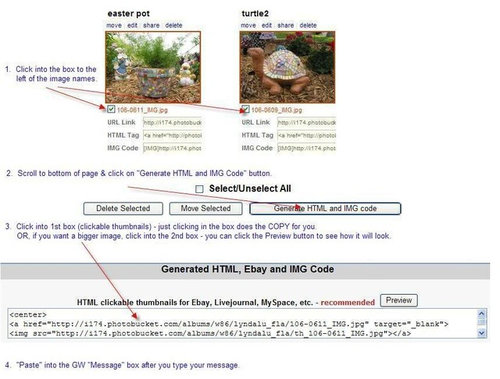
| This is in response to a question on how to post multiple pictures. I've shared these instructions with a few people via emails, and just figured out how to share it here.
I thought I'd put this in a separate post, so we could refer new people to it. These instructions are for Photobucket. If someone has instructions for some of the other photo sharing sites, maybe they could add to this thread? ![]() |
Follow-Up Postings:
|
- Posted by ladyronnie (My Page) on Sat, Sep 29, 07 at 21:34
| Hey, LYNDALU! There's a way quicker way with photobucket. Don't click that little box, just single left click on the HTML tag line, anywhere in the address. Then within your post, right click where you want your photo, and click Paste. The address is inserted, and when you Preview Post, the photo appears. Granted you can only do one photo at a time this way, but still seems way quicker to me. Or maybe just less confusing to my aging gray matter! No doubt this thread will be appreciated, either way. Thanks for starting it! |
|
- Posted by sunshine_funshine (My Page) on Sat, Sep 29, 07 at 21:41
| Hey thanks for going to all the trouble! I appreciate any help I can get!! |
|
| wow cool! thanks Lyndalu, I wondered how you make a thumbnail just never explored it! Great tutorial! LOL |
|
- Posted by yellow-rose (My Page) on Sat, Sep 29, 07 at 22:36
| Greatly appreciated! I was wasteing way too much time trying to figure it out. I'd rather be reading old posts and learning new fun things! |
|
- Posted by bamasusanna (My Page) on Sat, Sep 29, 07 at 23:27
| Thanks for that info Lyndalu! I do mine the same way Ladyronnie does. BUT...What I would love to know is how you do it so that a thumbnail shows up in the message, but it enlarges when you click on it. |
|
| Hi Bama.....it does what you want if you click on that first box (in step #3 - thumbnails) - puts it in as a thumbnail, but it does enlarge when you click on it. I always use the method above, even if I only want 1 photo, because you can control the size of the picture - either the thumbnail, or bigger (with the 2nd box), and they give you the PREVIEW button, so you can know what it will look like. |
|
- Posted by bamasusanna (My Page) on Sat, Sep 29, 07 at 23:47
|
- Posted by sunshine_funshine (My Page) on Sun, Sep 30, 07 at 7:52
| OK Bama-What IS that? I see the pic, but what is it? |
|
- Posted by crafty_lady (My Page) on Sun, Sep 30, 07 at 9:01
| Bama...is that where old beach glass goes to die???? |
|
| WHERE IS THAT? WOW! |
|
- Posted by ladyronnie (My Page) on Sun, Sep 30, 07 at 18:28
| Hey again LYNDA! Thanks for clarifying that your way will give you a thumbnail instead of the big pic. (Maybe you said that up front and I missed it. I'm pretty dopey these days!) I'm sure they load quicker that way, so that's a bonus! I'll try to remember to follow your instructions next time I post a pic (Could be a while considering how I am NOT mosaicing these days, just hate pulling everything out on the dining room table. We are planning a big renovation later this fall, so I'm "waiting" until I have my new shop space, as well as more time!) |
|
| Holy COW, bama- DO TELL!!!! Lynda- old dogs CAN learn new tricks! I always wondered about that thumbnail thing, and the 'generate' feature. Most excellent! Thanks! |
|
| Thanks! Good info ! Maria |
|
- Posted by bamasusanna (My Page) on Sun, Sep 30, 07 at 21:36
|
- Posted by bamasusanna (My Page) on Sun, Sep 30, 07 at 23:06
|
- Posted by crackpotannie (My Page) on Mon, Oct 1, 07 at 10:04
| Bama,I'm going to Austin next week,do you have the name of shop and more directions where it is...Oh my I think I'm in trouble!Thanks Annie |
|
- Posted by crackpotannie (My Page) on Mon, Oct 1, 07 at 10:19
| Test,since I can n |
|
- Posted by crackpotannie (My Page) on Mon, Oct 1, 07 at 10:22
| Picture worked but why did the msg split up like that??Thanks |
|
- Posted by slowmedown (My Page) on Mon, Oct 1, 07 at 10:37
|
- Posted by slowmedown (My Page) on Mon, Oct 1, 07 at 10:38
| Well I'll be! Thanks, LYNDALU. |
|
- Posted by bamasusanna (My Page) on Mon, Oct 1, 07 at 10:40
| Hey crackpot, LOVE your mosaics. Is that the set for the auction? Your words got split up because you accidently pasted your photo info in the midst of your sentence. I've done it before too! I wish I could tell you where exactly in Austin that was, but we found it by accident. When we first moved to TX, we'd spend weekends driving around exploring. One of those trips we ended up in Austin. We were driving around the Lake Travis area when we found that place. It really is on the side of the road though. You just eased off the road onto the gravel and you were there! If you haven't been to Lake Travis, you MUST go. It is incredibly beautiful, and there is a wonderful resteraunt with outside decks that overlooks it. I believe Oasis is the name. |
Here is a link that might be useful: Oasis
|
- Posted by crackpotannie (My Page) on Mon, Oct 1, 07 at 11:02
| Thanks Bama ,if I don't find it this time,I'll search it out another,we're going for my Grandsons wedding so may not have time to go to lake..thanks it looks wonderful. |
|
| I'm glad this has been helpful. On my first day on this forum, on my very first post, CURBDIVER told me how to do this. I thought that was soooo sweet of her. Thanks again, curb!!! And it's fun seeing the "test" pictures! :) |
|
- Posted by crafty_lady (My Page) on Mon, Oct 1, 07 at 12:39
| I post my pics the same way Lyndalu does. I like being able to click on the pic to make it bigger so I can look at the details in a project. Annie, when you check the preview button, if your message is split just go back and hit the enter key a few times to add a little more space before the picture. HTH Barb |
|
| Lyndalu, looks like GW needs to hire you. Thanks for the helpful diagram! |
|
|
| It doesn't take much to entertain us, does it. LOL NT - those are beautiful pics!!! |
|
| Crackpotannie - I was just at this glass place on Friday. It is called Living Desert and the address is 12719 Highway 71 West. It's just past Bee Cave Road on the left. It is kind of hard to get to right now due to construction on Hwy. 71. You have to go past it and then circle back. Kind of hard to see but it is right on the road. Phone number is 512-263-2428. Right now the glass is all $3.00 per pound. Plan to spend lots of time looking around - it's a fabulous place and the owners are super nice. They also specialize in cactus and succulents. |
|
- Posted by bamasusanna (My Page) on Tue, Oct 2, 07 at 10:15
| Whew!! I'm glad somebody else knew about that place. I felt bad I couldn't remember where it was after posting those pics!!It's a MUST see ain't it?? |
|
- Posted by crackpotannie (My Page) on Tue, Oct 2, 07 at 10:16
| Oh Linlee thanks so much!!!!!It really looks like a cool place.I even called the oasis to see if they knew about it and of course they did not..but thanks to you I can go there soon |
|
| Hey there Lindee, is this your first post? Welcome to the forum, show us your projects... what do you like to do? |
|
- Posted by sunshine_funshine (My Page) on Tue, Oct 2, 07 at 21:01
| Lyndalu-have used your instructions twice now. Thanks so much!! |
|
- Posted by ladyronnie (My Page) on Wed, Oct 3, 07 at 12:18
|
- Posted by ladyronnie (My Page) on Wed, Oct 3, 07 at 12:23
| I meant to ask...I thought it was in this thread but I don't see it now... Someone asked how you get the photos in a row across, and someone else (was that you, LYNDA?) said they could get them on the left side but not in a row. (I don't know how to make a row either). Could someone either point me to the thread, or tell me how to get them on the left side? Don't know why it matters to me, but I would prefer it. Thanks (again). |
|
- Posted by bamasusanna (My Page) on Wed, Oct 3, 07 at 13:55
| If you want your photo(s) on the left, just replace the word "center" at the beginning and end of your pasted code from photobucket to "left". |
|
- Posted by ladyronnie (My Page) on Wed, Oct 3, 07 at 17:26
| Thanks, BAMA |
|
| Also, if you want your photos to the left, if you just take out the center command, it will default to the left. And, I FINALLY figured out how to put the pictures NEXT to each other, instead of under each other. You should probably only do 4 or 5 across (thumbnails), or it will be too wide. Here's the instructions. I hope these are understandable!
|
|
- Posted by bamasusanna (My Page) on Wed, Oct 3, 07 at 18:58
|
| oh, good....I'm glad you tested it out, and that it worked for you, Bama. Cool! And OMG....love seeing those pieces again. Gorgeous!! |
|
- Posted by crackpotannie (My Page) on Thu, Oct 4, 07 at 4:19
|
| oh, I just discovered something else. If you don't want the pictures smooshed up against each other, you can hit the space bar once before you hit the Delete key, and it will leave a space between the pictures - like this: |
|
- Posted by ladyronnie (My Page) on Sat, Oct 6, 07 at 19:53
| Ok, it took me about three tries to get it to show up right, but I think I got it! So, isn't this really just a shameless way of putting some of our work in front of people again? ;) |
|
- Posted by sunshine_funshine (My Page) on Sun, Oct 7, 07 at 21:27
| Veronica-love the hurricane lamp. What a gorgeous pic!Lyndalu-have we seen those before? Love those frogs! Annie-dang landy! What a gorgeous pot and cross! Just had to comment 'cause I don't think I have seen those pics before and, WOW!! |
|
| Shameless...hey, I'm there...Uh I mean I want to try too (might as well, haven't finished anything lately) Maria |
|
| Now, could someone write a tutorial on how to do this, so that it can print it out in sequence? Appreciation is given before hand - THANKS! |
Please Note: Only registered members are able to post messages to this forum. If you are a member, please log in. If you aren't yet a member, join now!
Return to the Stained Glass & Mosaics Forum
Instructions
- You must be a registered member and logged in to post messages on our forums.
- Posting is a two-step process. Once you have composed your message, you will be taken to the preview page. You will then have a chance to review the contents and make changes.
- After posting your message, you may need to refresh the forum page in order to see it.
- It is illegal to post copyrighted material without the owner's consent.
- HTML codes are allowed in the message field only.
- No advertising is allowed in any of the forums.
- If you would like to practice posting or uploading photos, please visit our Test forum.
- If you need assistance, please Contact Us and we will be happy to help.