|
| Hello,
Wife came home today and was able to open garage door without a problem, but when tried to close it, the unit hums for a couple of seconds and stops. No movement of the door. I looked through the forum for awhile and saw some of the suggestions....the trolly was not up against the bolt, but I tried removing it and adjusting the Up travel away from the arrow without any success....still same hum and nothing else. The Learn button diagnostic blinks 5 times. Model 139.53914D Any help would be greatly appreciated! Thanks,
|
Follow-Up Postings:
|
| When you disengage the trolley from the track and try to close the door, what happens? How old is the door? Ron |
|
| Hi Ron, New home and new opener - less than a year old. Door works fine manually - moves easily along the track. The manual suggests disengaging the trolley - closing the door - adjusting the up travel against the arrow and then hitting the button with the door closed....this should have caused the trolley to move away from the motor toward the door....but I still just get the same hum. A couple other things I've tried after reading this forum... I unplugged overnight and then plugged it back it and gave it a few minutes hoping it would reset. I also stood directly in between the sensors in the doorway and hit the button to activate and got the rapid clicks - so I don't think that is the issue. Other than when I intentionally block the sendors, I get the same 2 second hum followed by the lights coming on. Thanks, |
|
- Posted by champlains (My Page) on Wed, Jan 9, 08 at 11:06
| How can I reset the wall pad. The codes we put it doesn't take. The keypad flashes a few times and doesn't recognize the code. We just changed it since we just bought this house, but we are not sure if we did it correctly. We tried the old codes too and it doesn't work either...just flashes |
|
- Posted by juliefixit (My Page) on Tue, Jan 15, 08 at 17:10
| Hello, My Craftman garage door works properly with the wall mounted control, the remotes will open the door but the remote will not close the door. Any suggestions? |
|
- Posted by don_1_2006 (My Page) on Tue, Jan 15, 08 at 17:56
| Is the main light flashing 10 times. If so the sensors in the doorway are out of alignment. They each should have a small light that is lit when they are properly aligned. Tweak them a bit. |
|
- Posted by Neil(ntcarson@gmail.com) onFri, Jan 18, 08 at 11:07
| I'm having what appears to be the same issue as Matt, except for the age of the opener - mine is roughly ten years old. The garage door functions well manually. The sensors don't seem to be an issue at all. When activated from the wall button, the motor humms for a moment and the light comes on, but no motion. I assumed the motor has failed and plan to replace the unit. However, if I can avoid replacing the unit, that would be great. Thanks, Neil |
|
| Neil, Take a look at the trolley. It is that silver thing thats riding on the black rail. Your chain or belt attaches to it at both sides. Make sure it is not jammed up against a stop bolt either in the up position or the down postion. If you can't tell by looking at it, take the chain off the sprocket and hit the button if the motor still just hums for a second then it is bad if it starts working then the trolley is jammed and needs to be freed. If you motor will run and not open the door you have a stripped drive gear. So if you hit the button and you can hear the motor humming until you hit the button again then the drive gear inside is stripped needs to be replaced. |
|
- Posted by thectrlshift (My Page) on Sat, Jan 17, 09 at 19:34
| This is an FYI for all with similar problems with this opener. I have a 1/2 HP Craftsman Belt Drive Garage Door Opener. Part # 41A5021-2B. Model 139.536645RT1. My opener was working, but the belt was not moving. similar to a problem stated above. I opened up the cover and it was quite clear that the drive gear was stripped. There were plastic shavings from the gear all over the inside of the unit. The gear was completely dead - it could not grip the screw-drive. I searched Sears and the internet for info on this model number with no real luck - just a few leads. This was the only site that had a forum talking about it. I went to my local Sears parts supply and got a replacement. There was just the gear and related pieces for about $24. And there was a gear and sprocket set for $8 more. Since the gear is mounted onto a shaft that turns another gear that moves the belt, i bought the entire assembly to save some time. Turns out that it was not the right piece. It was an assembly for a chain drive unit - even though the salesperson said it was made for my unit. Also, there is a round cover that screws into the chassis. The replacement piece was completely round, where mine has an arc cut out of it. This is important as a completely round piece would not have fit on the chassis properly. I wish that she would have sold me the entire assembly for a belt drive, because i decided to just take the gear off the new assembly and replace mine with the new one. That was a major hassle as there are two small pins holding the gear in place and they are really hard to get out. I had to improvise a tool to get them out. But once I replaced the gear, everything else was really pretty easy. The disassembly and re-assembly went quickly without incident. There are instructions that come in the kit. Everything is back up and operational. |
|
| Sears 139.53914D 1/2 hp opener. I replaced the drive gear by the instuctions and reassembled. Now the door will only close part way (about a foot) then come back up. This happens with both the remote and wall button. Both the sending and recieving sensors are solid green. The door does not make the clicking noise as it does when something is blocking the sensors. The motor still only runs for a few seconds then reverses. I have unplugged and replugged back in. I have 5 flashes of the fault light on side of unit. Any suggestions. |
|
- Posted by don_1_2006 (My Page) on Mon, Jan 19, 09 at 10:06
| Make sure you put the black cup back on the end of the motor shaft and that it is pressed all the way on. Make sure the rpm sensor is plugged in. If none of these are the issue, then you probably did not have the motor shaft pushed all the way back when you tightened the coupler after replacing the worm gear. Loosen that coupler up and from the front of the motor (opposite end in which the coupler is on) push the shaft back as far as it will go. Hold it there while you tighten the coupler back up and then try it. |
|
| My garage door won't close. It's a Craftsman opener. The light on the motor comes on, so it's getting power. When I push either the remote or the wall switch, nothing happens. No sound at all. There's nothing in the way of the sensors. The wall switch, I believe, used to have a light under the button. There's none now, but I may be mistaken. Any ideas? The door opens easily by hand, so I think the springs are okay. It crashes down when I close it by hand, because it's a heavy door. The opener is about 10 years old. Help would be appreciated. Is there a fuse or a reset button? Where would they be located? |
|
- Posted by don_1_2006 (My Page) on Mon, Mar 30, 09 at 18:51
| I would unplug the unit, remove the logic board and look for broken or burnt traces on the PC board. If your door crashes down when you close it there is definitely a problem there that needs to be tended to. The springs on the door are there to compensate for the weight of the door. It should not be that heavy. If you are not comfortable with removing the logic board maybe it is time to call for help and have the door checked at the same time. |
|
- Posted by Peter(pguilb6433@cox.net) onThu, Jan 13, 11 at 9:17
| my sensors are over 10 years old and iI can't get them to light up. do i need new sensors or is there a way to clean and reset the sensors. Rhode Island just had a 20 inches of snow ant the sensors could have gotten wet. |
|
| call the installer! |
|
| pguilb: Did they work fine and then just quit one day? Are both lights now off? Check the leads for any breaks or shorts. If the sender is off then the reciever will be off because it's not sensing anything. Replacement sensors are available from sears. The door should still work going up and should still go down by manually holding the wall button for the full closure. If nothing is working then the problem is not necessarily related to the sensors. Hope that helps. |
|
- Posted by carl(carl.janak@hotmail.com) onThu, Jan 27, 11 at 23:02
| Model 139.53662srt will not go up or down. Bulbs on each side of unit will not come on. Pressing the remote or hard wired operator results in a couple of clicks which seem to be coming from the logic board. The little light next to the programming button on the unit blinks 5 times and stops, blinks 5 times and stops, blinks 5.... The logic board # is 41A5021-2B. Time to replace this board? If so, where can i get one? |
|
| I've been having problems with my Craftsman door opener lately too. First, the door wouldn't close completely...it would go down a foot and then come right back up. So I adjusted the screws on the unit and that worked for a few weeks. It started doing it again a couple of days ago, so I adjusted the screws again (and I think I adjusted them way too much) and couldn't get the door to close. And now, the motor hums twice but the door does not move. Door works smoothly manually. Any help? |
|
| Hoping for help as it looks like many know what they are talking about here... My door opener was acting up on my Craftsman Door. I thought it was the battery in the remote so I replaced it. Now it won't open at all. So, I thought I should re-sync it. Noticed that the instructions on the back of the unit are slightly different from the ones printed in the manual. I've also read how some are suggesting other ways to program the remotes. Therefore, can someone give me a foolproof step by step on how to reprogram the remote and get my door working again by remote. Door works just fine by the wall console. Here's the specifics: Unit is model 139.53677SRT1 1/2 H.P. Installed in 1997 Remote is the basic 3 button style I appreciate anyone helping me to get this going again. I've followed the instructions on back of unit and in the printed manual to no avail. Instructions say that the opener light should flash while holding in the buttons, but it never flashes - it just stays on a few seconds and then goes out. |
|
- Posted by don_1_2006 (My Page) on Tue, Feb 14, 12 at 16:33
| Press and hold the button you want to operate the door on the remote while you press and immediately release the smart/learn button on the rear of the motor unit. Release the button on the remote. If this doesn't program the opener you have either a bad remote or a bad receiver in the opener. If you only have the one remote there is no way to tell which one is bad. |
|
| I do have 2 remotes. Tried the method you suggested, but neither one seemed to work. The manual suggested holding down the remote button, the light button on wall control and then push the door control push button. It then says, "after the light flashes, release all buttons." I've tried doing all this at once (with the help of my daughter) and nothing seems to work. Is there another step I'm missing or ??? |
|
- Posted by don_1_2006 (My Page) on Wed, Feb 15, 12 at 9:29
| You are not missing anything you have a bad logic board. |
|
- Posted by doneandgone (My Page) on Sun, Aug 26, 12 at 14:08
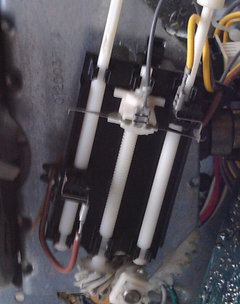
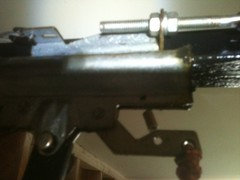
| For everyone having the problem with your garage door not closing... I've read this entire blog and tried everything suggested. The force/travel adjustments would solve my problem for a while then it would come back so, if you've already checked sensors, wiring for damage/connection, adjusted the up/down force, adjusted the up/down travel here's something to try before buying a new opener: Inside the unit find the up/down travel adjustment mechanism(see photo). At the end opposite the screw-heads you turn to adjust the travel there is a gear mechanism. When these gears wear they can slip. In addition, the chassis for the gears is plastic and over time will weaken-my opener is almost 12 years old! My gears are still in pretty good shape. The problem is that the chassis would flex and allow the gears to jump hence, the reason my adjustments would work for a while then the problem would come back. Now I know this will sound like a hokey fix but I figure it is better than dropping a couple hundred bucks on a new opener...I pushed a toothpick into the hole in the main chassis where the travel mechanism is snapped in essentially eliminating the chassis from flexing and allowing the gears to slip. make sure you do this on the side opposite the gears. If you do it on the same side you will put a larger space between the gears making the problem worse. This has been working for nearly a month now. I attached a picture of the travel adjust mechanism for reference. It is difficult to see the toothpick in the photo. It is right next to the brown wire connection opposite end of the mechanism from the adjustment screw heads. One other hint: the opener will most likely get hot running the door up and down making your adjustments and will shut off (thermal overload protection). I don't know why but after this happened the green light next to the remote programming button on the back would flash 5 times-off-flash 5 times...repeatedly. I had to pull the power for a couple minutes to get the light to stop blinking. Either let the unit cool for about 10 minutes after it shuts off or to keep your unit from overheating, place a small floor fan in position to blow on the motor. Craftsman 1/2 HP model# 139.53971SRT manufacture date: 02/2000 |
|
- Posted by cnjstewart (My Page) on Wed, Sep 5, 12 at 14:55
| I am having the exact same problem as Craig012 mentioned back on Feb 14, 12. My remotes will not work or reprogram but the wall unit operates the door just fine. I have tried all combinations of reprogramming (walking through the manual, speaking to Chamberlain customer service, and even using a replacement universal remote). You mentioned that there must be a bad logic board. If that is the case is the there a way to confirm that it's the logic board and once you know for sure what do you do to fix it? Thanks. |
Please Note: Only registered members are able to post messages to this forum. If you are a member, please log in. If you aren't yet a member, join now!
Return to the Home Repair Forum
Instructions
- You must be a registered member and logged in to post messages on our forums.
- Posting is a two-step process. Once you have composed your message, you will be taken to the preview page. You will then have a chance to review the contents and make changes.
- After posting your message, you may need to refresh the forum page in order to see it.
- It is illegal to post copyrighted material without the owner's consent.
- HTML codes are allowed in the message field only.
- No advertising is allowed in any of the forums.
- If you would like to practice posting or uploading photos, please visit our Test forum.
- If you need assistance, please Contact Us and we will be happy to help.