







Fisher and Paykel GWL11 Top Loading Washer
My GWL11 Top loading washer has had nothing but problems! The current problem right now is that it won't stop beeping at me near the end of it's run (near the rinse and spin cycle). I have ran it about 20 times and it stops at the same spot each time. I did try and run it with just a few clothes and it still did the same thing, however when i took everything out it worked. I have unplugged it and plugged it back in, but that didn't reset it. Is there a way for me to reset it or get it back on balance if that is the problem? no one in my town services fisher and paykel so to have a tech come here would be about $200 for driving and diagnosis alone. I need help!!!
Comments (344)

dadoes
4 years agoI'd suspect the thermistor seal before the inlet valves ... but either or both could be source of leaking in the console. Suggest (carefully!) running the inlet valves with the console open after changing the board and whatever else you aim to do to observe/confirm the leak is handled.
Bit of trivia ... models up to GWL08 have a water-cooled motor board. The water inlet mixing chamber interfaces into a heat sink in the board. Some cold water may dribble in briefly if the board needs a cooling refresh. I have a GWL08 20+yo, only repair thus far was replacement of the pump 8 or 9-ish years ago.
Related Professionals
Beavercreek Kitchen & Bathroom Designers · Lenexa Kitchen & Bathroom Designers · New Castle Kitchen & Bathroom Designers · Cherry Hill Kitchen & Bathroom Designers · Harrison Cabinets & Cabinetry · Sacramento Custom Closet Designers · East Grand Rapids Flooring Contractors · Land O' Lakes Flooring Contractors · Lansdale Flooring Contractors · Lodi Flooring Contractors · Long Beach Flooring Contractors · Maltby Flooring Contractors · Marietta Flooring Contractors · Old Bridge Flooring Contractors · Summerville Flooring Contractorsdadoes
4 years agoSeal alone is 426752 or 426752P, depending on where/if available from a given source.
Thermistor + seal is 479193P (or 424428P).

William Bronshvag
4 years agoAlso would the thermistor seal cause water to leak on the ground and not just inside the console. Presently there’s no moisture on the ground but water in the tub
dadoes
4 years agoWater will overflow out of the console basin if it fills. There are airflow slots cut in the back, and it can leak out of the hole for the off-balance switch which is to the right and sort-of under the board.
Confirming a water leakage source is an "eyeballs on it" situation. Water will reasonably leak out of the thermistor seal only when the valves are open and the mixing chamber is filled/under pressure. Residual water pooled in the console may drip out of the OOB switch area once it gets below the airflow slots.
I can't see your machine, and you weren't there when the leaking occurred. You can't run the valves with the board dead (they're not A/C powered) to observe the leak source directly so you have to decide which other parts along with the board you want to replace up-front. Or clean up the pooled water, replace the board, check what's leaking, and then get whichever more parts may be needed.

Julie G
4 years agoI did the machine setting, but after I had started the load and it wasn't draining. I emptied it, and then did the machine setting. I took apart the top to make sure the pressure tube wasn't kinked. I do believe it was a bit, and/or I just needed to set the machine when it was empty. I tested the pump in diagnostic mode and it would not spin. I ordered and replaced the pump. It has now completed many cycles. I must have damaged the pump when I was seating in the bearing in the tub. I had it up on a stool, but I likely was still putting pressure on it enough to damage it/bend the metal near the fan. Mistakes were made, but I learned a lot and still saved money versus calling a repairman. Thank you!
William Bronshvag
4 years agoSo good point on the thermistor seal. It was loose and the chamber was unsealed up top.
Changed the board and left it unplugged until the new therm seal came today in the mail. The new board lit up good when we installed it last week (therm seal had to be back ordered from fp so had to wait). When I plugged it back in I get error code 00110001 which is for inlet valve. Which were also replaced last week. Any suggestions
dadoes
4 years ago49 cold valve. The fault didn't occur on first power-up of the new board? You test-powered it only once? Occurred after sitting a few days and changing the thermistor seal? Possibility 1, a wire problem, loose connection, ground? Possibility 2, flaky board (new board, or used?).
William Bronshvag
4 years agoFirst power up of used board ordered off eBay was fine
Yes installed board last week, lit up fine and then unplugged it waiting for new therm seal to come in.
Installed new therm seal yesterday plugged machine back in and got that fault signal. Which by coincidence is identical to a fault I got on a board I replaced last year. This is my third board on this machine. The original ended up giving me this same error code after a roommate tried to replace the hoses unaware that the shut off valve in the wall was damaged and water sprayed everywhere. I just assumed it was a fried board because when a new board was put in, (the one that got flooded from the therm seal giving out) it lit up fine and worked no problem.dadoes
4 years agoPossible the display board also got wet? It pairs with the motor board to run the machine so flakiness can occur if either/both is bad.
The roommate-replacing-hoses flood mentioned above is a separate incident from the roommate-found-water-leaking-out-everywhere-when-doing-laundry incident described in your 12/26/2019 post?
Maybe the eBay/used board is bad? Return to seller, try another?
Just to say ... I refurbed a GWL11 summer of 2018 for my mother to use that was given to me by a friend and sat in my garage for several years. The diverter circuit on the motor board was bad, keeping the diverter energized continuously. The machine could be used with the original bad board on Perm Press (on which diverter function is not involved) but no other cycle due to draining during Eco Active. It repeatedly blew new/used motor boards, even with different display boards/consoles. All components tested within spec. I was not going to let the machine win, LOL, so I ended up changing all the components except the water valves, lid lock, and motor rotor/stator. (I changed it from a GWL11 to an IWL12 with a used panel via eBay, which was the plan all along.) There was a slight leak on the pump but it already had a fuse (which was not blowing) so the pump did get replaced. My guess is that the diverter (which tested good on resistance) was flaky and possibly the RPS (no way to test those without a special tester/tool).
William Bronshvag
4 years agoYes two separate incidents with the hose replacement.
I ordered a new updated board off Amazon. It is different in appearance. Am I to understand that this new one doesn’t require hooking up the fuse that came with the replacement drain pump? It’s built into the board already?
dadoes
4 years agoPhoto of this board? Some replacement boards may include the fuse kit. The add-on fuse is spliced into one of the pump wires so there's no way to avoid it if one has been installed unless the fuse holder is cut out and the wire mended, which I don't think should be done. Only one fuse is needed so don't add another (or replace what's already there) if another kit came with this latest board.
Different version boards may have a different appearance, and some "new" boards are refurbished. Try to make sure it's the proper board by Part Number for the machine. A newer version board may be refurbished/reprogrammed/substituted for an older version machine.
Original Phase 6 boards may have an SD11 sticker.
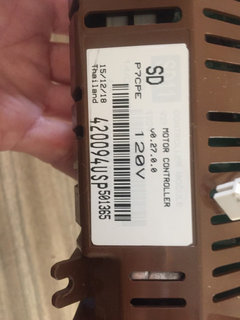
Phase 7 boards for agitator/Eco models have P7CP (Phase 7 Conventional Pump) or P7CPE (Phase 7 Conventional Pump Eco).
Phase 7 (GWL15) has different rotor/stator voltage/characteristics than Phase 6 (GWL11) ... but a Phase 7 board may be refurbished/reprogrammed for Phase 6. I have a board tagged P7CP, but also Part Number 420094USP which is Phase 6.
William Bronshvag
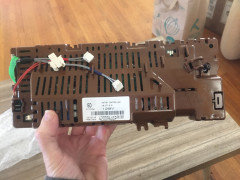
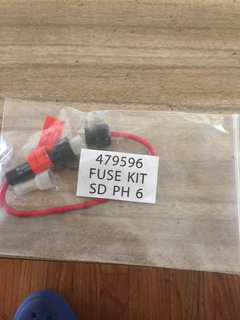
4 years agoSo here are a couple shots. It did come with an external fuse kit included so hmmm
dadoes
4 years agoIt's a Phase 7 board (P7CPE) refurbed for a Phase 6 machine (Part Number 420094USP).
There is no pump fuse integral to the board. Use the fuse kit if you don't already have one installed. Are instructions included? It splices into the brown pump wire. I have a sheet, can post pics if needed.
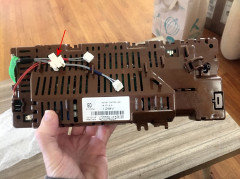
The diverter connects to the indicated connector. The harnesses with red and blue tape are of course the hot and cold water solenoids.
William Bronshvag
4 years agoAlso it sat idle for a few weeks with water still in it and started to smell so I’m running it empty permanent press temp warm with some borax powder down the pole that should be good yes
dadoes
4 years agoI don't have much hands-on with borax but many here are fond of it. Chlorine bleach is effective on moldy residue.
dadoes
4 years agoAlso, you can get a full-fill hot wash by programming Perm Press onto the Favorite button. That's the recommended method of cleaning the machine/tub. Press/hold Favorite until it beeps & flashes. Select Perm Press, hot temperature, press Favorite to save the programming. Then the hot wash cycle can be run when needed, for either washing clothes or cleaning the tub. (Only one custom program can be set at a time on Favorite, redo the programming to change it.) You can change the various options (such as Hot/Warm or Warm temp, or a specific water level or Auto instead of the default High) for a given run after selecting Favorite without affecting the saved program.
dadoes
4 years agoQuilts, blankets, and comforters (that fit) should be run on Delicate. Don't use the auto-sensing water level function, manually select an appropriate level, usually med/high or high but med may be suitable for some smaller pieces. Delicate has a shorter wash time so repeat the wash period if desired ... Pause the cycle at end of the wash immediately when drain begins, press Delicate to reset the cycle and Start (it won't re-run Eco Active if the tub is already filled).
Any cycle is OK for sheets.
Delicate allows Slow or Med spin speed (Fast perhaps can be selected but it won't stick, will change to Slow when the final spin begins) but spin can be re-run on Fast via Regular or Heavy if desired (select the cycle, press Advance to the final Spin light, Start) for better extraction of heavy items (make sure the item is reasonably balanced).
Delicate, Woolens, Perm Press, and Regular have default shorter-than-maximum wash times. Any cycle can be customized for maximum wash time by pressing the button a few seconds for two quick beeps (light flashes), press Advance to adjust the wash time (keep pressing it at minimum to wrap back around to maximum), then press the cycle button to save. Shorter time can be run for any given load by pressing Advance to adjust the time before Start. Each green light is 3 mins.
Lee Wright
4 years agoIt seems @dadoes may be the FP whisperer. I have followed all recommendations with my 2005 GWL11 and am still getting a fault code 49, cold water valve, and am completely stumped...I have checked the wiring, replaced the valve, and then replaced the motor controller. When I check the old valve and the new one with a multimeter, they are both within range. There was no check of the old board; I was told that that’s the likely problem if replacing the valve didn’t do it. (I made the mistake of not checking the original valve before replacing it.). ... I am wondering if the problem is something else. Shortly before this happened, the tub was filling slowly. I checked the inlet screens on the faucet end of the hose, and the cold one (I think) was nearly filled with sediment. I replaced the hose washer screens, flushed the hoses, and reconnected them. I believe I was able to run one or two loads and then got the fault, which I have not been able to clear. ... One other datapoint: After I put in the new controller and set the machine size, i was able to plug the machine in without immediately getting the fault. Then when I tried to run it I got the fault and can‘t get past it. ... Greatly appreciate any suggestions and would happily to contribute generously to a “tip jar” or the equivalent.
dadoes
4 years agoFault 49 is an electrical or electronics issue so the machine filling slowly due to a clogged sediment screen would not trigger it.
Did you get a new valve and board, or used items via eBay (that may be flaky)?
Mystery scenarios like this, unfortunately, may require becoming a PCM -- parts changing monkey -- and start replacing other seemingly unrelated items (See my post above January 7). Does the hot valve test within specs?
Lee Wright
4 years agoThank you very much for your reply. (Missed the notification.). Yes, the hot valve tests correctly. And the board came from a reputable supply house, not eBay or similar. As I’m sure you know, the recommended steps include checking for bent pins or a broken wire, and I don’t see either. ... I have been very pleased with the machine, and other than replacing the water pump, which was very easy to do, it has been excellent. I much prefer additional troubleshooting—even being a PCM—since what I read about most new machines doesn‘t instill confidence. All other recommendations for troubleshooting greatly appreciated.
dadoes
4 years agoDid you do a continuity test on the cold harness wires? May need to get
needle probes for your meter. I don't have any other suggestions. The
board checks the hot & cold valve circuits immediately on
connection to power. Bad valve, bad board, wiring issue. *Maybe* a
flaky thermistor could trigger erratic behavior since it's part of the
fill control process ... but there are separate fault codes related to
it.Lee Wright
4 years agoThank you for the suggestion. I just checked the wiring harness for the cold water valve for continuity and it's okay. I also went back and measured the resistance on the two cold valves I have: 60.3 and 58.5, and I believe that indicates that the original one wasn't bad after all. (I made the mistake of not checking it before replacing it.) I bought the motor control unit, which was new, from a reputable appliance parts supplier.
I believe those are the three things that the manual says to check: Wiring harness, valve, and motor controller. I'm wondering if perhaps the motor controller I took out is fine, too, and there is some other cause.
I greatly appreciate your help. Any final suggestions? One of the reasons I was hesitant to call a repairman is that I thought I could fix this myself. At this point, I'm wondering if the average repairman (as opposed to someone who has extensive experience with this same or similar machine) can fix it either. Thoughts?
And again, thank you for sharing your expertise.dadoes
4 years agoI would seek a return/exchange on the board. GWL11 replacement boards are all refurbished. Some are Phase 7 (GWL15) boards reworked for Phase 6 (GWL11) machines. Could be the new board is bad, it happens. Advise the vendor that you have already replaced the cold valve and it (and the hot valve) checks within spec, checked the wiring harness, etc. and all of that is good. If the vendor is not cooperative on an exchange, then perhaps check eBay for a low-cost used board.

Scott Neader
4 years agoHI all! GWL11 stopped full of water, "Lid Locked" light is solid red. Opening/closing lid and trying to press Start does nothing. Looked over service manual and a lot of Google searches, and not finding much yet, other than ideas on disabling the lid lock mechanism. I've spent a lot of quality repair time with our GWL10, but this is my first experience working on our GWL11. I am not even sure how to remove the top! Open to ideas!
dadoes
4 years agoGWL11 and GWL10 are the same physical design. GWL11 has a different electrical design. The pump runs on 110v/120v instead of 230v. Top deck is opened by removing the two lid bumpers near the front corners, screws beneath. Bail the water, examine the pump for evidence of leaking. If so, and your machine doesn't have the retrofit pump fuse, then the bad pump probably zapped the motor board. Or maybe some other problem. Physically disabling the lid lock won't help if the motor board is damaged. The board must "see" the lock electrically engaged for the machine to spin.
Scott Neader
4 years agoThank you dadoes for always being here for us! I have since found out that my daughter had earlier heard it beeping and tried to "fix" it by advancing. I unplugged, waited 10 sec, plugged back in, then restarted from the final wash cycle. Everything is fine until it gets to Rinse, at which point I hear a mild "humming" noise (pump trying to operate?), then eventually I got a 00100101 error code "Pump Blocked Error - No Change In Water Level". I bailed the water (did not remove the top deck or basket), then tilted the washer up enough to get a good look underneath. NO signs of leakage and no dryer sheets or anything wrapped around the pump. When I try to manually spin the pump, I can feel some resistance, especially in one direction where, after spinning it a couple of revolutions, it gets harder to turn, but I can turn through it.
Unless you think otherwise, I plan to pull the pump and inspect for an obstruction inside and while I have it out, I can check resistance (7 ohms). FYI, I can confirm there is no retrofit fuse. My main concern is after bailing as much water as possible with the basket still in place, I think there may still be a lot of water inside (however, when I replaced my GWL10 pump, the amount of water that came out was manageable -- so maybe I'll be fine). Thanks again!!dadoes
4 years agoThere is some water in the tub under the basket that is not accessible for bailing unless the basket is removed. Spillage can be minimized by leaning the machine over on the left side so the pump is effectively toward the top of the tub, which puts the water below it. Just don't lean it so far that water leaks over the top of the tub (the tub cover isn't enough water-tight to prevent it from leaking).
The pump should of course spin freely in both directions. Suspect lint or strings wrapped around/under the impeller (the impeller can be unscrewed) or a foreign object in the sump area. You may need to go in from the top depending on what's there.
The original-style pump went NLA a year+ ago (the source vendor shut down their manufacturing facility) but F&P has sourced a replacement from another supplier. Replacement pumps come with the fuse kit (which is spliced into a pump wire inside the console). You may be able to find the fuse kit online as a separate item, highly-recommended it be installed.
HU-288558016
4 years agoGreat info here. My question: on my FP GWL10 US the thermistor seal is leaking. Am getting new seal. What is correct way to replace that seal Thank you!
dadoes
4 years agoCarefully pull the thermistor up out of the seal. Work the seal out of the mixing chamber. Work the new seal into place (may be helpful to lubricate it with soapy water). Push the thermistor into position, far enough down so the end of it protrudes slightly into the mixing chamber.
Lee Wright
4 years agoBack again, still trying to fix my GWL11, which continues to have a 49 error code (cold water valve). Really appreciate the help. ... I followed the suggestion of getting a replacement board (from GenuineAppliancParts, who has been great to deal with), but get the same error. I am inclined to believe that the fault code isn’t indicating what is wrong. I have replaced the cold water valve and both the original and the replacement have the correct resistance, and as I noted above, I have tried two replacement motor controllers. Tonight I discovered that, after unplugging the machine and disconnecting every wiring harness from that motor controller except power and ground, I still get the 49 fault code. ... Any suggestions? Thanks, again, for your help.
dadoes
4 years agoFault 49 seems to take precedence over anything else. The machine checks the hot & cold valve circuits immediately upon connection to power (plugging in the cord). The only way I can get a hot valve fault on my machines is disconnect the hot valve only. Disconnecting *both* hot and cold throws 49 for cold.
I know you said you've checked the cold valve wire harness but I can't come up with anything under what you describe except a wire/connection problem ... a broken wire, shorted wire, or one of the pins (at the valve or the board) is not making contact.
The wires to the pump, SmartDrive motor and RPS pass behind the tub support at the right/rear corner of the cabinet and are subject to potential cut or breakage from flexing or rubbing against the sharp edge of the cabinet when the top deck is repeatedly raised up/down during service procedures (the wire bundle there has a heavy wrap of electrical tape to help protect against cuts but the tape can loosen over time or wear through with repeated rubbing or flexing against the cabinet). The water valve wires are short and within the console and not subject to that kind of physical stress so that's part of your mystery.
HU-288558016
4 years agoThanks for hand holding re thermistor seal replacement. Install was easy. Lost the motor control unit and Fisher Paykel repair man told me unit not available, and that cause was water entering that area from washer fill water. Located a place in Illinois what would repair my unit so sent it off : https://www.partsimple.com. A week later got it back, started machine and discovered that the water leak was from the thermistor seal...and found the thermistor to be badly corroded. Replaced and machine is functioning! Fisher Paykel no longer sells the top loading washer and matching dryer in the US. Their website shows only front loading units. I did not have a parts manual and went to Fisher Paykel parts and lady sent me a PDF allowing me to identify the parts that I needed. Thank you again for your support!
dadoes
4 years agoGWL10 was the first U.S. model with the Eco Active feature and recirculation valve. It also has a unique electrical design in the F&P model-family, with a pump specific to that model (no other F&P toploader takes it).
I doubt PartSimple directly repairs boards, more likely they sent it to CorecentricSolutions.com, which you can also do yourself. I've bought parts a couple times via PartSimple, prices are usually higher than other sources, unless a specific item comes through as less.
Used boards can be found via eBay, although a given part number may not always be listed until searching/checking repeatedly.
Lee Wright
4 years ago@dadoesThank you for the explanation on the sequence of checks the machine makes and the excellent suggestion about checking the wiring carefully earlier today. I took a close look and the wires all look fine. A harness for the hot and cold valves came with the new board. Something doesn't seem to add up. I'll let you know when I get it figured out. (I keep thinking: Is it something simply I'm overlooking?) Again, really appreciate your help.
dadoes
4 years agoYes, it was in my mind previously that replacement boards typically include valve harnesses ... but what else could be involved? Maybe both cold valves you have are flaky. :-/
Or grounding problem somewhere?
Do you have a service manual for resistance readings on the various components? Maybe there's a weird feedback coming from something else that's affecting the cold valve circuit? Note that the RPS cannot be tested without a special tool from F&P (do not try to take resistance readings on it).

Maria Cashore
3 years agoHello Dadoes! I bet you can help me! I am replacing the control module on a GWL11. The set up is a bit different than the original board. Seem to have everything hooked up except for what I assume are 2 green ground wires. There are 2 side by side prongs on lower left of board. Are these where the grounds go? Does it matter which goes on which? (I am not electrically inclined and don't want to screw something up....) Thank you!
dadoes
3 years agoThe green ground wires connect to terminals on the board in an open slot near where the power cord attaches. Doesn't matter which green to which terminal.
One pic with the power cord plug connected, and one at a slightly different angle with the power harness plug disconnected.
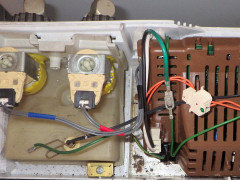
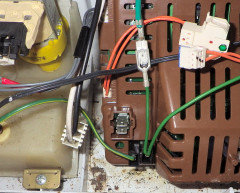
Maria Cashore
3 years agoWow, dadoes, you really are the whisperer. Thanks! Hopefully this will work and I won't be back with more questions.
Maria Cashore
3 years agoAaaand I'm back. I am weary of researching this washing machine for weeks now, so I'm just going to ask here without further digging through this and other threads, in case anyone can easily answer. Just replaced the control module on GWL11. Installed with new fuse spliced into brown wire. Reconnected properly as best I can tell. Plugged in, it gave a short string of beeps. Then it would not turn on. Power button seems to be slightly depressed or misaligned but nothing has been done to the display module other than unplugging/replugging the wires that plug in directly under the power button. Wondering what I may have done wrong and hoping that it doesn't mean another replacement part. . . . . Thanks!
dadoes
3 years agoWhat led you to replace the board? If there's a contributing problem
that caused your original board to fail, such as a bad pump, that
problem MUST be identified and fixed along with replacing the board or
the new board probably will fail (possibly immediately).It beeped (and flashed some lights on the panel?) when you plugged in the power cord but then went dead (no lights?) and now the buttons don't work at all?
What happens if you unplug the cord, wait a few mins, then plug in again?
New motor boards typically require that the machine size be set. A fault code will trigger if it's not set. I can give you instructions for the procedure ... but it can't be done if the buttons don't respond.
Maria Cashore
3 years agoInitially the machine would not drain, it was stuck recirculating. When this first started, I went into diagnostic mode and the lights would just blink for more than 5 minutes then shut off without giving me any fault code. I tried that several times.
I had hoped I could just replace the wax motor but could not find a suitable replacement so I got the entire new diverter valve. I replaced the diverter valve but that did not change anything, it was still just recirculating, not draining. So then I replaced the board.
[It beeped (and flashed some lights on the panel?) when you plugged in the power cord but then went dead (no lights?) and now the buttons don't work at all?] --- Yup. Same thing after several attempts with time in between. Tried holding down power button. Nothing.
Upon further poking at the display panel, with it removed, with one hand placed underneath, I could clearly feel when I pressed the buttons on the right side. And they felt "normal" when I pushed them, as when starting a load. But I could not feel the Power button and the Favorite button, both all the way on the left. The only other thing of note is that the plug that connects the wires from the display panel to the control module (which is directly behind the power button) was especially tricky to unplug/replug.dadoes
3 years agoYes, the motor board can fail in a way that keeps the diverter powered continuously (whenever the machine is connected to power).
Unfortunately, the board probably has gone bad again for some reason. From where did you source the new board?
Display boards can go bad but less common than motor boards.
Did you remove the display board from the console during your investigations? Is it perhaps askew such that the far-left buttons are misaligned from the overlay?
There's no way to access diagnostic mode or any other set-up mode (such as machine size) if the machine is non-responsive.
Fault codes are viewed by pressing Spin Speed (up or down) until both Slow and Hold are lit. You did that procedure correctly when checking?
Machine Size is set (with power off) by pressing/holding Water Temp Up (instead of Temp Down for Diagnostics), then Power. The selected size is indicated by Cold (small tub), Low (medium tub), or Hold (large tub). Press the the appropriate Temp, Level, or Spin Up button to select, then Power to exit. All US machines are large tub.
You can try swapping-in the old board if you still have it to see what happens. It works other than the diverter problem?
The various wire connectors are different sizes so should only fit to the correct locations (other than a smaller connector possibly into a wrong larger socket).
dadoes
3 years agoTechnically there are no longer new boards being produced for GWL11. Failed boards are repaired and sold as refurbished. In some instances slightly newer boards (usually Phase 7 boards) are reworked and relabeled for GWL11 (which is a Phase 6 machine). There are several sources. Amazon isn't direct from F&P. Make sure you got the correct part number 420094USP.
CorecentricSolutions.com is a source that repairs boards, and they usually also sell the repair service through eBay.
Maria Cashore
3 years agoDefinitely the right part number. "OEM authorized part. New." Led me to believe it was not refurbished. But, no matter, because I reinstalled the old control module and had the same problem, couldn't turn it on. I guess I will now move on to replacing the display/touchpad. No chance it could have anything to do with how I spliced in the fuse?
dadoes
3 years agoThe pump circuit fuse shouldn't have any potential to affect the motor board. The pump won't run if the fuse blows but the machine otherwise will power-on and operate to the extent that it can without the pump. If the fuse kit was installed wrong ... depends on exactly what might be involved on that. If on a wrong wire that carries more amperage than the pump, the fuse may blow and possibly make the machine go dead.
There is a fuse on the motor board but it's soldered in place, not considered replaceable as a field repair. There's typically some other failed or blown component on the board that causes the board fuse to blow so that would also need to be identified and replaced. That's what Corecentric does. You could carefully open the board shell to check if that fuse is blown ... but not a good idea if there's a warranty and security seal on your replacement board unless you're not concerned about that.
If your display board is blown, you might consider checking for a used board/console via eBay (some sellers offer a short warranty or return period). Don't get GWL11 mixed up with other models that have similar consoles, they're not all compatible with each other. You can upgrade a GWL11 to an IWL12 or IWL15 panel, but not an IWL16.












Frank Wagner