Return to the Home Decorating Forum | Post a Follow-Up

 o
How to post a picture in your actual post??

Posted by lovetoshop (My Page) on
Wed, Jul 11, 07 at 22:00

I have read the directions on how to provide a link to pics in photobucket or similar, but how do you post the pics in your actual post so they are visiable when someone reads the thread?

Thanks!


Follow-Up Postings:

 o
RE: How to post a picture in your actual post??

I've been wondering this as well...thanks for asking and hopefully we can post our pic's soon!


 o
RE: How to post a picture in your actual post??

Me too...just wasted 30 minutes trying to figure it out...now I don't feel so alone!!!!


 o
RE: How to post a picture in your actual post??

Try reading in this link. It's basic HTML programming, you just have to know what to type in.

Here is a link that might be useful: HTML primer


 o
RE: How to post a picture in your actual post??

alicepalace- that HTML stuff may as well have been written in another language! I need simple directions for the technically challenged please :)


 o
RE: How to post a picture in your actual post??

I just posted this for someone else:

Start by getting your photos onto your computer. Then download them onto a photo-sharing site such as Photobucket. (That's what I use.) Make sure you say that you want to share your photos, or that your album is public, or whatever their terminology is.

Now go into your album. Under each photo there should be four tag lines. If you want to put a photo into a post just copy the tagline marked "HTML tag" and paste it into the message wherever you want the photo to appear. When you preview your message, you should be able to see the photo.

Just post again if you have any questions.


 o
RE: How to post a picture in your actual post??

Here's how.

Put your photo into photobucket or find a photo on the internet. Either way, you will have an http address for your photo.

Highlight this http address.

Then go to "Edit" and press "copy".

In the text of your post, type this:

< img src=

Except there should be no space before the "img". (I had to put the space here so that it would appear here as readable text.)

After the equal sign, paste your http address.

Then, after the address, type a ">".

There should be no spaces in your command line EXCEPT between "img" and "src". (This stands for "image source" by the way.)

When you preview your message, your photo will appear.


 o
RE: How to post a picture in your actual post??

bump


 o
RE: How to post a picture in your actual post??

Maybe I can do this:
Photo Sharing and Video Hosting at Photobucket


 o
RE: How to post a picture in your actual post??

Good instructions. I've tried this before but this is the first time it worked. Whew. Thanks.


 o
RE: How to post a picture in your actual post??

You're welcome!!!

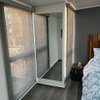
Nice room, Elizabeth. LOVE the mirror!!!!


 o
RE: How to post a picture in your actual post??

rented vacation house --I thought about putting the mantle up for critique but I realize that is not fair --since it is an exercise in futility and I'd have to put it back the way I found it.


 o
RE: How to post a picture in your actual post??

comment on instructions -- I think the reason McClarke's directions worked for me is that for the first time I registered (I'm not saying no one else included this) that you put the codes in the message and then the picture appears in the preview. I always gave up too soon.


 o
RE: How to post a picture in your actual post??

I'm going to try! I too spent about a half hour this morning trying to figure it out.
Here goes:

Photo Sharing and Video Hosting at Photobucket


 o
RE: How to post a picture in your actual post??

Just trying this out:

img src=http://s181.photobucket.com/albums/x4/lovemyhappylife/?action=view ¤t=IMG_0387_resize.jpg


 o
RE: How to post a picture in your actual post??

try #1


 o
RE: How to post a picture in your actual post??

Lovetoshop, you forgot to put the < at the beginning of your command and the > at the end.

Sorry, jen9, something is not working. Is this a photo from photobucket?


 o
RE: How to post a picture in your actual post??

This is JUST a test -- this is only a test ......

[IMG]http://i16.tinypic.com/54cev55.jpg[/IMG]

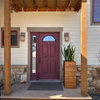
My front door from a test on TinyPic


 o
RE: 2 How to post a picture in your actual post??

drat ---- sorry about that!

I really must learn to do this .... so if you can just bear with my lack of "techie-ness"

Sigh ....

http://i16.tinypic.com/54cev55.jpg

Here we go!


 o
RE: How to post a picture in your actual post??

Almost there, teacats!!!

You just forgot to surround your http command with the image source code.

Put in your code like this:

< img src=http://i16.tinypic.com/54cev55.jpg>

EXCEPT, I put in one extra space between the "<" and the "img" so that the command would print here, and not show up as a photo.

Try it!


 o
RE: How to post a picture in your actual post??

yes - it is a photo from photobucket. I just opened the photobucket account - is there something else I need to do there? I swear I am following the instructions, but all that shows up is that little red box. Thoughts anyone??


 o
RE: 3 How to post a picture in your actual post??

Once again -- into the breach ......


 o
RE: 4 How to post a picture in your actual post??

Me too! Me too!

What the devil am I doing WRONG???? My photo is in photobucket!! I clicked "share" but still can't seem to make the blasted right move!!!!


 o
RE: How to post a picture in your actual post??

Teacats, is this the photo you are trying to post?

See below photo for the command I used to get it into the post....

This is the command I used...

< img src=http://i16.tinypic.com/54cev55.jpg>

EXCEPT that in THIS command in the line directly above, I have inserted a space between the "<" and the "img" so that the system will see this as text, not as an image command.

If I were to take out this space, the system would read this as an image command and would produce the actual photo in my post.

Try copying and pasting the command I typed... put it in a post of your own... TAKE OUT THE EXTRA SPACE... and your photo will appear.


 o
RE: b - How to post a picture in your actual post??

Trying again!!! and I now have a single photo in tinypic and photobucket -- LOL! Can you tell that I'm desperate!

Bless you mclarke -- and I'll keep trying!

GOT IT!!!!! I kept forgetting to take OUT the IMG (and those funny brackets) on both ends of the command line -- not sure how to re-size ..... on tinypics but still trying on photobucket too


 o
RE: Can you see this picture of a bathroom 'before' fixing?

Can anyone see this?
I posted some pictures on a different thread; I could see them but no one else could. Some miracle person "fixed" something, and then they showed up. My pictures are in the Kodak gallery and there doesn't seem to be any place to click a single picture to be public.

Thanks so much


 o
Photobucket test !

Photo Sharing and Video Hosting at Photobucket

I DID IT -- on photobucket!!!!

I think I clicked on the One-Click address to be able to switch it over and THEN clicked on Select All (its a box under the addresses .......)


 o
RE: Another photo from photobucket showing my new pub bench

Photo Sharing and Video Hosting at Photobucket

Here's another photo -- re-sized but I'm not quite sure how I did it --- but I DID!!!

((many hugs and chocolate going out to everyone who posted instructions and especially to mclarke!!))

This is my pub bench that I bought at a garage sale this spring and then painted a distressed black satin.


 o
RE: How to post a picture in your actual post??

Go to tinypic.com Upload your pic, it converts it to html. Click on "Copy" beside "HTML for Websites" rather than "IMG Code for Forums & Message Boards". Then simply paste it into the body of your message.


 o
RE: How to post a picture in your actual post??

YAAAAY, teacats!!!!!

And now we can all see your adorable Rosemary Cottage!!! Stunning bench!

Happygram, it looks like your photo is in kodakgallery. Can you transfer it to photobucket?


 o
RE: How to post a picture in your actual post??

< img src=http://s192.photobucket.com/albums/z80/jen9_photo/>


 o
RE: How to post a picture in your actual post??

TeaCats, that's your house?! I love it. Excellent work :)


 o
RE: How to post a picture in your actual post??

Almost, Jen9.

"http://s192.photobucket.com/albums/z80/jen9_photo/" is not a complete url for a photo. It should end with "jpg."

Then all you have to do is delete the extra space between the "<" and the "img".


 o
RE: How to post a picture in your actual post??

MClarke:

How do I transfer something to Photobucket?

The reason I went to Kodak is because Yahoo no longer will be hosting pictures and my albums needed to be transferred.

I don't know how to make the pictures in Kodak "public".

Thanks so much.


 o
RE: How to post a picture in your actual post??


 o
RE: How to post a picture in your actual post??

Hey Jen9 --

Go to the photobucket and sign up --

Then click on the link for "Uploading" --

And follow the directions from there.

Here's photobucket:

Here is a link that might be useful: photobucket


 o
RE: How to post a picture in your actual post??


 o
RE: How to post a picture in your actual post??

happygram,
There may be an easier way, but when I need to copy pics from one site to another I open the image, right click on it, select 'Save Image As', and then save it to my Desktop. You can relocate anywhere on your computer but I find it easy to keep a folder on my desktop just for pics.

Then upload to photobucket, or wherever.


 o
RE: How to post a picture in your actual post??BTW

I forgot to mention........if you're using photobucket you don't have to use, or remember, any codes. Just copy the 'HTML Tag' under each photo and paste it within your text.


 o
RE: How to post a picture in your actual post??

annz, then maybe that is a reason for me to start to use photobucket for this site. Thanks!


 o
RE: How to post a picture in your actual post??

YAAAAAAY Jen! We can see your photo!!!!!

Yep, copying the HTML tag from photobucket will work also.

When you do this, you will be copying in the --

< a href=

-- command, and you don't have to add anything or type anything, or remember the --

< img src=

-- command.


 o
RE: How to post a picture in your actual post??

img src=http://farm2.static.flickr.com/1245/1480687606_a5a0e39851.jpg?v=0


 o
RE: How to post a picture in your actual post??


 o
RE: How to post a picture in your actual post??

I went to Tinypic and uploaded pics of my comp room .
I even managed to figure out how to save them in favorites.
It didn't take me but 2hrs and 15 min to do 4 pics.
Now I couldn't figure how to paste because :
#1 When I have the GW up and try to bring up the Tinypic site....GW is gone.
I have never copyed or pasted soooooo I guess I will just never do it. I'm crying uncle.
My pics are there but I'm here.

I have never felt so computer dumb.


 o
RE: How to post a picture in your actual post??

You did everything right except you need to embrace your post with < >. Open and close with these symbols, no spaces, just

< img src=yourlinkhere > and I added a space in the areas where I told you not to so mine would not be wonky on the post, so do exactly what I did except omit the space after < and the space before >


 o
RE: How to post a picture in your actual post??

I am trying to figure out how to do this too. Master bedroom makeover:

Photo Sharing and Video Hosting at Photobucket


 o
RE: How to post a picture in your actual post??

twg that is a gorgeous room!


 o
attempt here I go

testing here...Photo Sharing and Video Hosting at Photobucket

(dont yell if it doesnt work)


 o
RE: How to post a picture ??

I am going to try this one time.
This is a test.


 o
RE: How to ??

I'm just going to slink off into the tantrum room.
I typed my link in and it didn't show up..period.


 o
RE: How ??


 o
RE: How to??

I know I know. Its huge but I'm jumping up and down on that stripe sofa and swinging from the ceiling fan!!!!
I have been trying this for a while like 40 days and 40 nights lol

How do I make pis smaller?


 o
RE: How to post a picture in your actual post??


DH bought shelves from Lowes and put up so I could get favorite books out of boxes.

These pictures are of my computer room which was suppose to be a walk in closet . I love it. Its my get away.
Its probably 9x11


 o
RE: How to post a picture in your actual post??

I am testing to see if I can get this to work.
Photo Sharing and Video Hosting at Photobucket


 o
it worked!

It worked! I am copying the instructions into a Word document. I am thrilled to finally learn how to do this. Thanks to you all for bringing up the topic and to those of you who responded. Yiipppeeeee!


 o
RE: How to post a picture in your actual post??

My test


I'm using Flickr, and the photo is not showing up in preview. ANy tips for Flickr users?


 o
RE: How to post a picture in your actual post??

On Flickr, you open your photo, click on "all sizes" button above the photo, choose size and scroll down to see the url in the second box. Paste that after the < img src= command, close it with > and, voila!


 o
RE: How to post a picture in your actual post??

abby, posie, jen, teacats,indygo,elizabeth,twg and anyone else I am forgetting.

I am having the best laugh because we are so happy we have finally conquered this pic posting thing.
I am as excited over this as I was when I got my new bathroom.

Doesn't take much to make us happy does it? lol
Thanks to all of you great ladies who walked us through it


 o
RE: How to post a picture in your actual post??

trying it out......

Photo Sharing and Video Hosting at Photobucket

Woo hooooooo I think it worked!


 o
RE: How to post a picture in your actual post??

one more
try?


 o
RE: How to post a picture in your actual post??

OK, I too am going to give this a try. First the easy way. See my window here:
Photo Sharing and Video Hosting at Photobucket


 o
RE: Trying to make it smaller

Here we go with the website/email size:

Photo Sharing and Video Hosting at Photobucket


 o
RE: How to post a picture in your actual post??

Wow there are sure some adorable rooms here, and the cottage is just darling! That little black and white striped couch room is just charming.

Elizabeth, would you pretty please post a good head-on shot of that mirror above the fireplace? I'd love to see it.

I'm so thrilled you all are learning to post pics. My thought about pics is "more, more, more!"


 o
RE: How to post a picture in your actual post??

Wow---so neat to have these directions. Now I'll have to try. These are just model home pics--not great quality, but had to learn this while such great teachers are here. And LOVE all the pictures...gorgeous BR twg and adore teacats bench and the black striped sofa of lilhome....and on and on! Here goes..


 o
RE: How to post a picture in your actual post??

Good job all of you. It is really cool to be able to do this for the first time. My son wrote out the line of code and taped it to my computer monitor. That's how I finally got it, by being able to read it right in front of me everytime I wanted to insert a photo.

Note for any who are testing their skills.......when you type out your message and insert your photo, the photo WILL show up when you hit "preview message" before submitting. So, if there is no photo on the preview page, there won't be one on the real deal.

Red


 o
Trying again....won't give up yet

Here goes one more try of a model home...not mine.Photo Sharing and Video Hosting at Photobucket


 o
How exciting this is! Hurray...finally!

And thanks to Red for your comment about seeing it in the preview window. I wondered about that since I was seeing
nothing there, but seeing something in my message window. I think I had to adjust my account options about sharing to get mine to work.

Thanks to all of you for the great instructions! I had no
idea I was so computer challenged until this. (Hanging head in shame, but gloating over new accomplishment...)


 o
Twg

Your bedroom is just lovely! That's an awesome bed frame.


 o Post a Follow-Up

Please Note: Only registered members are able to post messages to this forum.

    If you are a member, please log in.

    If you aren't yet a member, join now!


Return to the Home Decorating Forum

Instructions

  • You must be a registered member and logged in to post messages on our forums.
  • Posting is a two-step process. Once you have composed your message, you will be taken to the preview page. You will then have a chance to review the contents and make changes.
  • After posting your message, you may need to refresh the forum page in order to see it.
  • It is illegal to post copyrighted material without the owner's consent.
  • HTML codes are allowed in the message field only.
  • No advertising is allowed in any of the forums.
  • If you would like to practice posting or uploading photos, please visit our Test forum.
  • If you need assistance, please Contact Us and we will be happy to help.


Click here to learn more about in-text links on this page.